
Flux 2 Flex: The Chameleon of AI Image Generation
In the rapidly evolving world of generative AI, specialized tools often garner the most attention. We have models that are fast, models that are realistic, and models that are artistic. But what if you need a model that can shift gears between all three? Enter Flux 2 Flex.
Released by Black Forest Labs as part of their ground-breaking FLUX.2 suite in late 2025, Flux 2 Flex (often stylized as FLUX.2 [flex]) represents a different philosophy in AI development. While its sibling, Flux 2 Pro, chases ultimate fidelity at any cost, and Flux 2 Dev opens the hood for code-savvy builders, Flux 2 Flex is designed for the high-velocity creative professional who needs adaptability above all else.
This article serves as your comprehensive guide to understanding, mastering, and integrating Flux 2 Flex into your workflow. We will strip away the marketing jargon and look at what this model actually does, how to talk to it, and where it might trip you up.
Understanding the "Flex" Architecture
The "Flex" in the name isn't just branding; it refers to the model's unique architecture which exposes a broader range of inference parameters than standard diffusion models. It is built to be "elastic" in its performance, scaling from rapid concepting to high-fidelity final renders without needing to switch checkpoints.
1. Granular Inference Control
Most users are used to a simple "Quality vs. Speed" slider. Flux 2 Flex explodes this into granular controls. It allows you to decouple guidance scale (how closely it follows the prompt) from structure adherence (how strict the composition is). This means you can have a highly stylized, abstract image that still rigidly follows a specific logo layout—a feat that was notoriously difficult in previous generations.
2. The Multi-Reference Engine
Perhaps the most "killer feature" of Flux 2 Flex is its native ability to ingest up to 10 distinct reference images simultaneously. Unlike purely text-based prompting, you can feed it:
- A color palette image.
- A character reference sheet.
- A style reference (e.g., a specific painter's brushwork).
- A product shot.
The model successfully blends these distinct signals into a cohesive output without the "muddy" look that often plagues multi-adapter workflows/LoRAs. This makes it an absolute beast for branding campaigns where consistency is non-negotiable.
3. Native 4-Megapixel Rendering
Flux 2 Flex is optimized for high-resolution output right out of the gate. It handles resolutions up to 4 megapixels (approx. 2048x2048) natively, meaning you don't need to rely as heavily on external upscalers that might hallucinate unwanted details. The texture fidelity at this resolution, especially for skin pores and fabric weaves, is remarkably "grounded," avoiding the plastic, smooth look of older models.
Crafting the Perfect Flux 2 Flex Prompt
Prompting for Flux 2 Flex requires a shift in mindset. Because the model is so adaptable, it relies on you to set the boundaries. If you are vague, it will default to a "middle-of-the-road" realism. To unlock its full potential, your prompts need to be directive regarding style, lighting, and camera, similar to directing a film crew.
The "Flex" Prompting Framework
I recommend using a [Subject] + [Context] + [Technical Specs] + [Style Modifier] structure.
- Subject: Be precise. Don't say "a car." Say "a vintage 1967 Mustang with rust spots on the fender."
- Context: Define the world. "Parked in a neon-lit Tokyo alleyway at midnight."
- Technical Specs: This is where Flux 2 Flex shines. Use camera terminology. "Shot on IMAX 70mm, f/1.4 aperture, motion blur, ISO 800."
- Style Modifier: Tell it how to "flex." "Hyper-realistic," "Line art," "Oil impasto," "Corporate Memphis."
Category-Specific Prompt Examples
Here are curated examples to demonstrate the model's range.
1. The "Brand Consistency" Shot (Marketing)
Goal: To place a specific product in a lifestyle setting without distorting the logo.
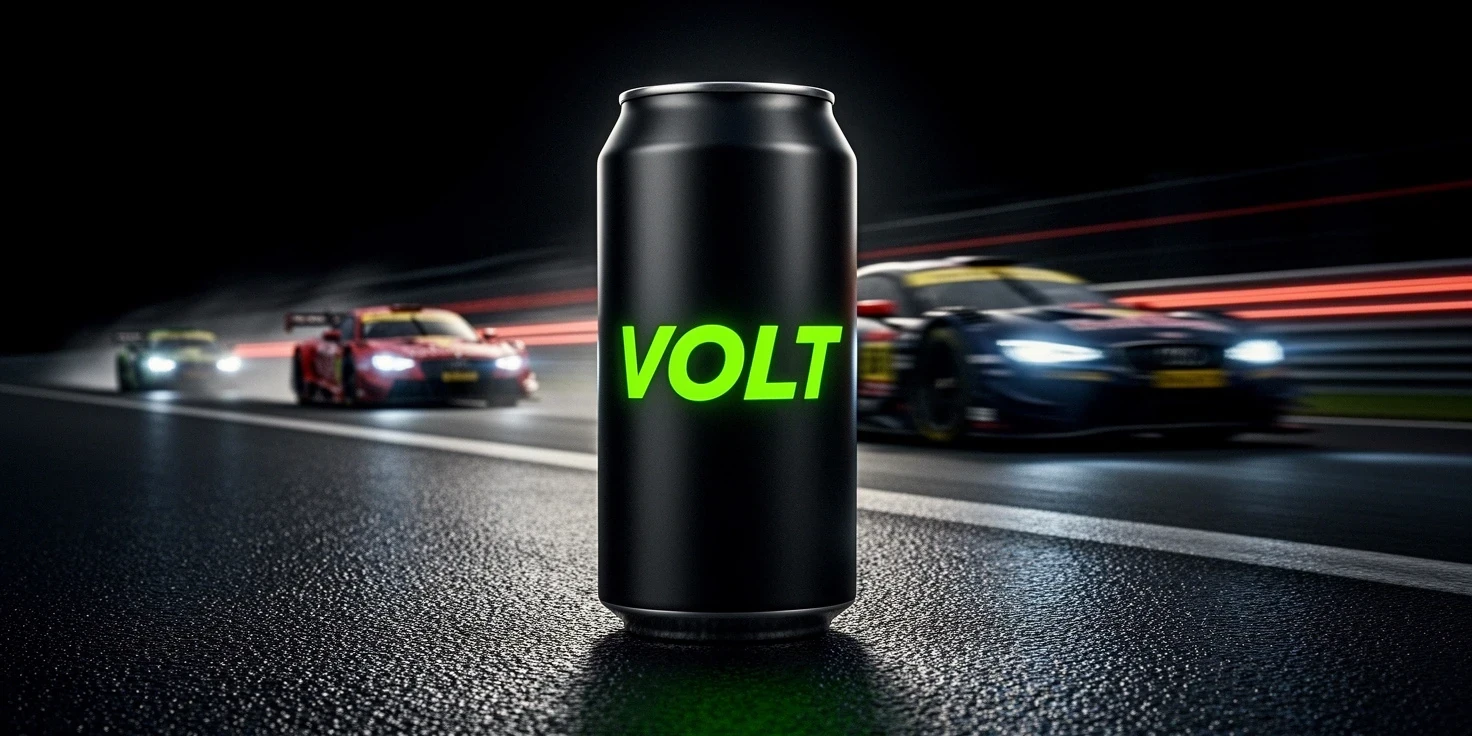
Prompt: "A high-end commercial product shot of a sleek matte-black energy drink can labeled 'VOLT' in neon green typography. The can is resting on a wet asphalt surface at a race track. In the background, blurred race cars zoom past with motion trails. Cinematic lighting, high contrast, rim lighting on the can events. The text 'VOLT' is perfectly legible and sharp. Hyper-realistic, 4k resolution, advertising quality."
- Why this works: Flux 2 Flex prioritizes the text 'VOLT' because of the layout cues. The "motion blur" instruction tells the model to soften the background, keeping the product sharp.
2. The "Stylized Character" Concept (Game Dev)
Goal: To create a character concept that looks hand-painted but retains 3D layout logic.

Prompt: "Full body concept art of a rogue cyber-archer. She is wearing scavenged robotic armor parts over a tattered hood. She holds a glowing energy bow. The art style is a blend of traditional oil painting and cel-shaded anime. Visible brush strokes, thick texture impasto, vibrant teal and orange color palette. White background, dynamic pose, rule of thirds composition."
- Why this works: The phrase "blend of traditional oil painting and cel-shaded anime" forces the model to flex between two distinct styles. Flux 2 Flex handles this hybridization exceptionally well without creating jarring artifacts.
3. The "UI/UX Mockup" (Web Design)
Goal: To generate a layout idea for a mobile app.
(I'm not sure why but SeaArt AI bot doesn't allow me to upload result here for this image, even though it's just a phone and passport image.)
Prompt: "A flat-lay UI design mockup for a travel booking application on an iPhone 16 screen. The screen displays a tropical destination card with the text 'Bali Getaway' and a 'Book Now' button in pill shape. Clean, minimalist aesthetic, lots of white space, soft drop shadows. The phone is placed on a light wooden desk next to a passport and a latte. Top-down view, soft daylight."
- Why this works: This tests the model's ability to render unwavering geometric shapes (the phone screen, the button) and specific text ('Bali Getaway').
4. The "Atmospheric Horror" Scene (Indie Film)
Goal: To use lighting and texture to create mood.
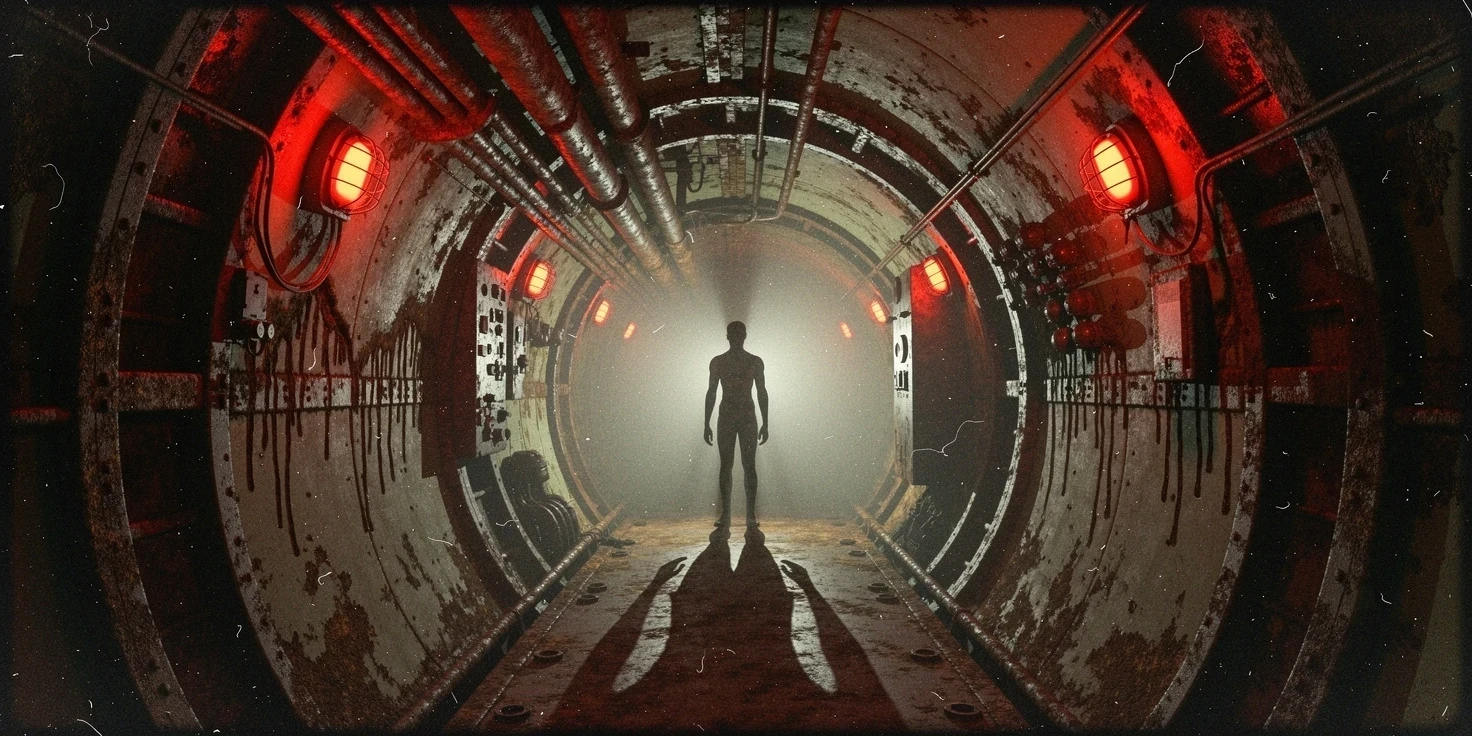
Prompt: "A claustrophobic corridor inside a derelict submarine. Flickering red emergency lights cast long, harsh shadows. Rust drips down the metallic walls. In the distance, a silhouette of a humanoid figure stands still. Volumetric fog, grainy film texture, VHS distortion effect, photorealistic environment, unsettling atmosphere."
- Why this works: The "VHS distortion effect" instruction leverages the model's ability to apply post-processing filters directly in the generation, saving a step in Photoshop.
The "Flex" Parameters: What You Need to Know
Unlike prompts, which are natural language, Flux 2 Flex also cares deeply about your generation settings. If you are using an API or a GUI (like ComfyUI or a web wrapper), pay attention to these:
Guidance Scale (The "Listener" Dial)
- Range: 1.0 - 20.0
- Sweet Spot: 3.5 - 7.0 for realism; 8.0 - 15.0 for typography/logos.
- Effect: Low values make the model more creative but less adherent to your text. High values force it to follow every word but can "burn" the image (high contrast, weird artifacts). Flux 2 Flex is sensitive; a value of 5.0 is often enough for great details.
Steps (The "Thinker" Dial)
- Range: 1 - 100
- Sweet Spot: 20 - 40.
- Effect: Flux 2 Flex is efficient. You rarely need more than 30 steps to get a clean image. Pushing it to 100 usually yields diminishing returns and wastes compute tokens.
What to Avoid: The "Don'ts" of Flux 2 Flex
Despite its versatility, Flux 2 Flex has pitfalls. Here is how to avoid ruining your generations.
1. The "Keyword Soup" Fallacy
Do not use old-school Stable Diffusion 1.5 prompt dumping.
- Avoid: "masterpiece, best quality, trending on artstation, 8k, highly detailed, sharp focus, hdr, 4k, 8k, 16k..."
- Why: Flux 2 Flex is trained on natural language captions. It understands "a beautiful photo" better than "masterpiece, best quality." Stuffing it with tags confuses the tokenizer and dilutes your actual subject description.
2. Overloading the Reference Images
Just because you can use 10 reference images doesn't mean you should.
- The Risk: If you feed it a style reference that contradicts your subject reference (e.g., a Picasso painting style reference + a photograph of a car subject reference), the model will struggle to resolve the conflict, often resulting in a messy "glitch art" look.
- The Fix: Start with 1 or 2 references. Only add more if you need to specifically inject a colour palette or a logo. Keep your references thematically aligned.
3. Ignoring the "Negative Space"
Flux 2 Flex loves to fill the frame. If you want a clean background, you must explicitly ask for it.
- Avoid: Just describing the subject and expecting a plain background.
- Do: "...isolated on a solid white background," or "...minimalist composition with negative space on the left."
4. Text Over-Complexity
While the model is great at text, it is not a typesetting engine for a novel.
- Avoid: "A poster with the full lyrics of Bohemian Rhapsody."
- Do: "A poster with the title 'QUEEN' in bold gold letters." Keep text requests to 3-5 words max for 100% accuracy. Anything longer increases the risk of typos.
Flux 2 Flex vs. The Market: How Does It Stack Up?
In the current generative AI ecosystem, choosing a model is like choosing a camera system. You have your "point-and-shoot" options that are easy but limiting, and your "cinema rig" options that are powerful but complex. Where does Flux 2 Flex land?
vs. Midjourney v7
Midjourney has long been the king of aesthetics. Midjourney v7, released around the same time as Flux 2, continues this trend with breathtaking, painterly visuals.
- The Difference: Midjourney is opinionated. It has a "secret sauce" that makes everything look good, often at the expense of your specific prompt instructions. Flux 2 Flex is obedient. If you ask for an "ugly, poorly lit room," Flex will give you exactly that. Midjourney might try to make the rust look "artistic."
- The Verdict: Use Midjourney for inspiration and "happy accidents." Use Flux 2 Flex when you have a client brief that must be followed to the letter.
vs. Stable Diffusion 3.5 Large
Stable Diffusion 3.5 (SD3.5) is the open-source community darling.
- The Difference: SD3.5 is raw power. It is incredibly customizable if you know how to train your own fine-tunes. However, out of the box, SD3.5 often struggles with complex spatial coherence (e.g., "a cat sitting on a hat under a table"). Flux 2 Flex's "rectified flow" architecture gives it a superior understanding of spatial relationships natively, requiring fewer re-rolls to get the composition right.
- The Verdict: SD3.5 is for the tinkerer who wants to build their own pipeline from scratch. Flux 2 Flex is for the professional who wants a pipeline that works immediately.
vs. Seedream 4.5
We recently discussed ByteDance's Seedream 4.5.
- The Difference: Seedream is focused heavily on "cinematic" and "video-ready" assets. Flux 2 Flex is broader. While Seedream might win on photo-realism for human portraits, Flux 2 Flex wins on graphic design, typography, and illustration styles.
- The Verdict: Use Seedream for your movie storyboard. Use Flux 2 Flex for your brand campaign and poster design.
Advanced Workflows: Beyond the Prompt
For the power users, Flux 2 Flex is just the engine; the real magic happens in how you build the car around it. Here are some advanced workflows that leverage Flex's unique capabilities.
1. The "Flex-Refine" Loop (Img2Img)
A common issue with AI is that it gets the composition right but the details wrong (or vice versa).
- The Workflow:
- Generate a "Sketch" image using Flux 2 Flex with a low step count (15 steps) and high guidance (8.0). This locks in the composition.
- Pass this output back into the model (Image-to-Image).
- Lower the guidance scale to 3.5 and increase the steps to 50.
- Add a "style reference" image.
- The Result: You get the solid composition of the first pass with the nuanced texture and lighting of the second pass. This "two-stage" generation is the secret to 4K images that don't look "melty."
2. Typography Injection via Control Layers
While Flux 2 Flex reads text well, you can guarantee it by using a simple black-and-white mask.
- The Workflow: Create a simple MS Paint image with black text on a white background. Feed this as a "Structure Reference" (ControlNet-style) input to Flux 2 Flex. Prompt for "Neon sign, grimy cyberpunk wall."
- The Result: The model will "texture" your text perfectly into the scene, creating signs that look physically built rather than just overlaid.
3. Local Inpainting for Product Fixes
Flux 2 Flex is exceptionally good at "masked edit" or inpainting.
- The Workflow: You generated a perfect model, but her hands are slightly wrong. Mask the hands. Prompt only for "elegant female hands, soft lighting" (do not describe the rest of the scene).
- The Tip: Set the "Denoising Strength" to 0.4. This tells Flex, "Keep the shape of the bad hands, but re-render the surface details."
Hardware and Deployment: Running Flux 2 Flex
This power comes at a cost. Flux 2 Flex is not a lightweight model like the old SD1.5 checkpoints that could run on a toaster.
Minimum System Requirements (Local)
- GPU: NVIDIA RTX 3090 / 4090 (24GB VRAM recommended).
- RAM: 32GB System RAM minimum (64GB preferred).
- Storage: Fast NVMe SSD. The model weights alone can be upwards of 20GB depending on the quantization level.
Cloud Deployment (The "Easy" Way)
For most users, running this locally is impractical. Cloud providers (like Replicate, Fal.ai, or dedicated Flux web UIs) are the standard way to access Flex.
- Cost: Generosity per image is higher than basic models, usually costing around $0.03 - $0.05 per high-res generation.
- Speed: On an H100 GPU cluster, a 4MP image takes about 4-6 seconds to generate.
Quantization: The "Lite" Version?
The community has released "quantized" versions (GGUF or NF4 formats) that compress the model to fit on smaller cards (like 12GB or 16GB GPUs).
- Does it hurt quality? Surprisingly, very little. 8-bit quantization is virtually indistinguishable from the full 16-bit model for 95% of use cases. If you are running on an RTX 4070 Ti, look for the "Q8_0" or "NF4" versions of Flux 2 Flex on Hugging Face.
Conclusion
Flux 2 Flex is aptly named. It is not just an image generator; it is a creative clay that molds itself to the user's intent. Whether you are a marketer needing strict brand adherence, a game designer exploring wild new aesthetics, or a hobbyist wanting to make cool wallpapers, this model has a setting for you.
The key to mastering it lies in the balance. Balance your prompts between creativity and instruction. Balance your reference images to avoid conflict. And mostly, balance your expectations—it's a tool, not a magician. But used correctly, it is the closest thing to magic we have in the digital art world today.
Go forth and flex your creativity.