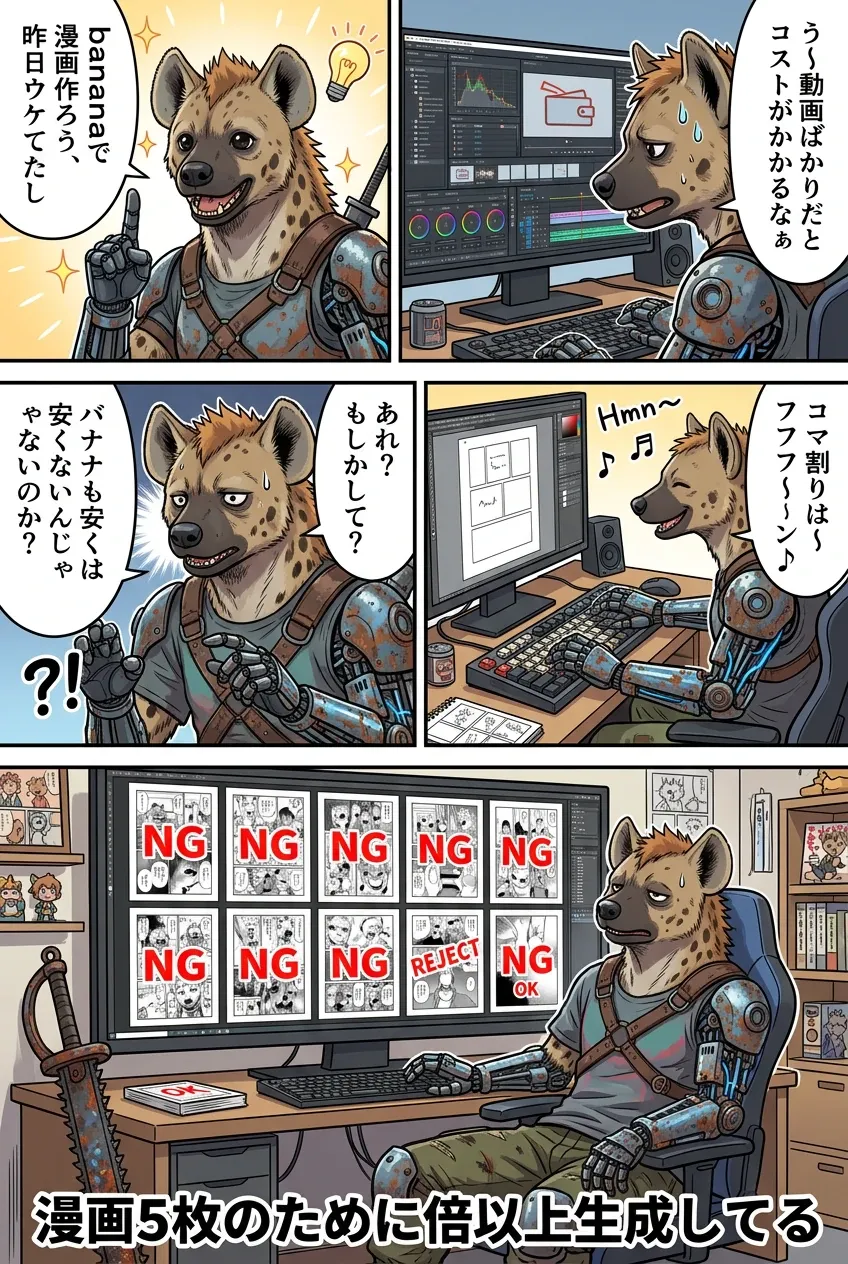

nanobanana2を使って日本語で漫画を描くためのプロンプト(例)
そのままプロンプトを上げています。
HTMLやプログラミングの基礎を学んだ人向けかもしれませんが、プロンプトにコメントを添えて説明しています。
コメント部分は色を変えているので、何をやっているか・どこを変えればいいかの参考にしてもらえたらと思います。
参考画像URLhttps://image.cdn2.seaart.me/2026-03-28/d73nn1le878c73ea7r6g/dcf3d83efea906795449651455a728c0.webp
ーーーーーーーーーーーーーーーーーーーーーーーーーーーーーーーーーーーーーーーーーーーーーーー
task: "image_to_image"
# 1. 【個性の固定】この項目は参照画像から主人公のアイデンティティを抽出・維持を指示しています
base_image:
use_reference_image: true
description: >
Use the person in the reference image as the protagonist.
Maintain face, hairstyle, body type, and clothing.
preserve:
subject:
- character_identity # 同一人物としての認識
- face
- hair
- clothing
- body_proportion
environment:
- room
- desk
- computer
- lighting
# 2. 【世界観の定義】日常コメディとしての画風と舞台設定を指定し全体のトーンを指示しています
style:
illustration: "colorful_anime_manga"
tone: "daily_comedy"
line: "clean_line_art"
shading: "soft_cel_shading"
environment:
setting: "indoor_private_room"
description: >
PC desk setup in a personal room.
Includes monitor, keyboard, and chair.
Calm indoor ambient lighting.
# 3. 【マンガの骨組み】日本式マンガの右から左への視線誘導を定義
page_layout:
aspect_ratio: "2:3" #ここでは不要ですが、Geminiでテストする際のアスペクト比を指定
reading_direction: "right_to_left" # 右から左へ読む設定
layout_structure: "2-2-1 panel grid" # 例は上から 2コマ-2コマ-1コマの構成
# 4. 【演出のスパイス】マンガ特有の記号(吹き出し・効果線)を付与
elements_to_add:
- speech_bubbles # セリフ用の吹き出し
- screen_ui # 画面内のUI表示
- manga_effect_lines # 集中線などの効果
- small_handwritten_notes # 補足テキスト
# 5. 【起承転結のシナリオ】各コマの状況説明(英語)とセリフ(日本語)
panels:
# Panel 1
- id: panel1 #コマごとにidを振り制御します
position: top_right #コマの位置を指示します
scene: > #コマごとにシーンを指示します
The protagonist looks slightly troubled while looking at the PC.
The screen shows a video editing software UI.
speech: #コマ内でのセリフを入れますダブルコーテーション囲い
- "う~動画ばかりだとコストがかかるなぁ"
# Panel 2
- id: panel2
position: top_left
scene: >
An inspired expression, raising an index finger as if having a bright idea.
speech:
- "bananaで漫画作ろう、昨日ウケてたし"
# Panel 3
- id: panel3
position: middle_right
scene: >
Happily operating the PC while humming.
The screen shows a manga manuscript with panel layouts.
speech:
- "コマ割りは~フフフ~ン♪"
# Panel 4:
- id: panel4
position: middle_left
scene: >
Stopping hands and showing a face of realization/suspicion.
speech:
- "あれ?もしかして?"
- "バナナも安くはないんじゃないのか?"
# Panel 5:
- id: panel5
position: bottom_full
size: "large_panel"
scene: >
The PC screen is filled with a grid of numerous generated images, including many rejected ones (NG).
The protagonist looks at the screen with a pulled-back, exhausted expression.
speech: [] #無言であることを指示
narration: #ナレーションを入れるときに使用
- "漫画5枚のために倍以上生成してる"
# 最終注釈:運用上のコツ 守ってほしいお約束を最後に念押し
notes:
- "Follow Japanese manga format (Right to Left)"
- "Place speech bubbles from right to left"
- "Maintain the rhythm of a slice-of-life comedy"
ーーーーーーーーーーーーーーーーーーーーーーーーーーーーーーーーーーーーーーーーーーーーーーー
いかがでしょうか?
日本語表記自体が完ぺきではないため、セリフの重複・省略はある程度発生します
経験上セリフの描写に重点を置きすぎると、他にほころびが出るのであえてしていません
NBPならそれもいけますけどね
ここではマンガの体裁以外のプロンプトはあえて説明を省いてますが、ここでこれを読んでいる方なら問題ないと思ってのことです。
それから、普通にここでこのプロンプト入れようとしても文字数制限で入らないので、ワークフロー使うかアプリ化されたナノバナナ2を使うといいですよ!
私は今回自作WFを使用しました。
これを使って、あなたも「生成AI漫画家デビュー」してみませんか?